
As you know, the Largest Contentful Paint (LCP) shows, it’s how fast the main content of a website shows on the screen. It tells when users see the biggest part of the page like an image or heading.
LCP is one of Google’s Core Web Vitals parameters. Google uses Cumulative Layout Shift (CLS) and Interaction to Next Paint (INP) to check website speed and user experience.
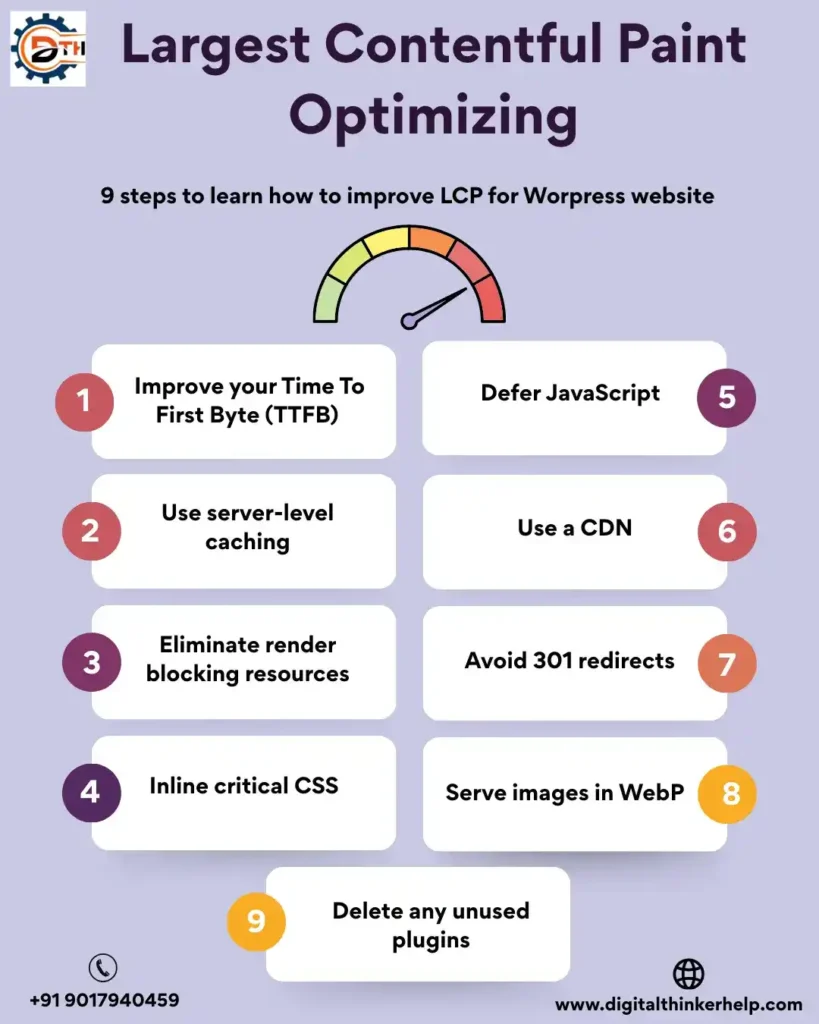
This article explains about LCP and how to check it on your website. There are simple ways to improve LCP for better speed and Google ranking.
What Is Largest Contentful Paint (LCP)? Meaning
Largest Contentful Paint (LCP) is a showing metric and how much time to load the main content of a webpage.
LCP is a part of Google’s Core Web Vitals, along with Cumulative Layout Shift (CLS). Google uses these to check website quality.
In simple words, LCP measures the time by clicking a page link the biggest text, image, or video are visible on the screen.
You may ask: what is “main content” in LCP?
Also Read: What is Service Schema? Examples & How to Add It
The main content depends on the webpage. But usually it can be one of these items below:
Text: Large text sections like headings, paragraphs or any block of readable content.
This may be Image or video:
Images inside <img> tags
Images inside <svg> elements
Videos inside <video> tags (included poster image)
Background images: Images added using CSS url () function are counted. But, CSS gradients are not including.
Why Is LCP Important For Website Performance?
LCP is important for website performance that users expect websites to load fast. When LCP is good, the site feels quicker and ready to use.
A better LCP score helps your website in many ways, such as:
Higher Google Rankings: LCP is a Core Web Vital. So, improving it is helping your website rank better on Google.
Lower Bounce Rate: When a website loads fast. Its users are less likely to leave the page quickly.
More Conversions: Faster websites usually get more leads, sales and customer actions.
What Is A Good LCP Score?
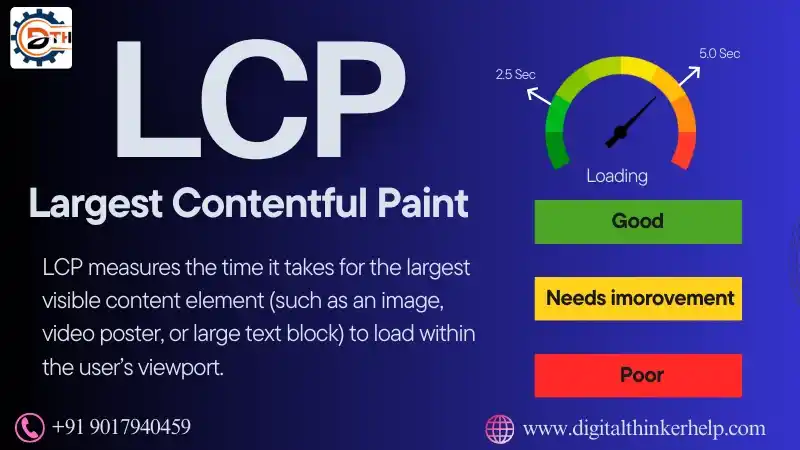
A good LCP score is 2.5 seconds or less. This meets Google’s Core Web Vitals guidelines.
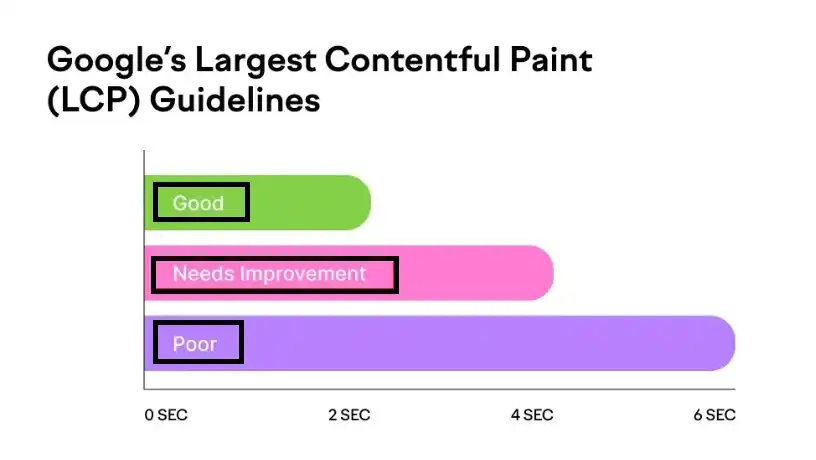
An LCP score between 2.5 to 4 seconds means your website needs little improvement.
An LCP score around 4 seconds is poor and needs important fixes to improve page speed and user.
How To Measure The Largest Contentful Paint?
The Core Web Vitals metrics are using to measure with Interaction to Next Paint (INP) and Largest Contentful Paint (LCP). You need a few tools and software.
Also Read: What is Event Schema? Example & How to Add (Full Guide)
Field data comes from real users visiting your website.
Lab data gets collected in a test environment.
Some tools use both to give a clear performance report.
One of the most popular tools to check LCP is Google PageSpeed Insights. It is a free tool that helps you to find about website speed issues and improvement tips.
Using PageSpeed Insights is very easy. Just follow these steps:
Enter or paste your website URL in the search box

Click on the Analyze button
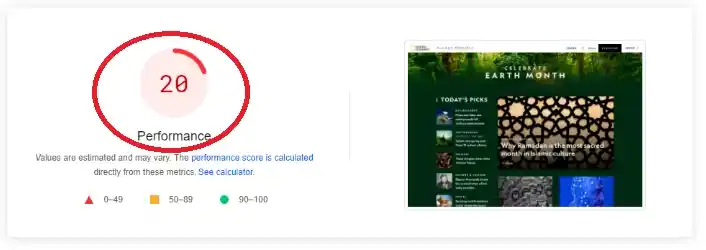
The performance test may take a few minutes to complete.
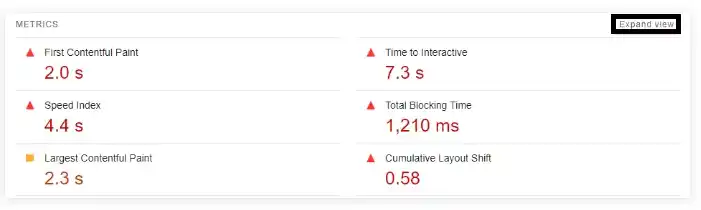
After the test is finished, go to the Diagnose performance issues section. Here you will see all the performance scores and suggestions for improvement.
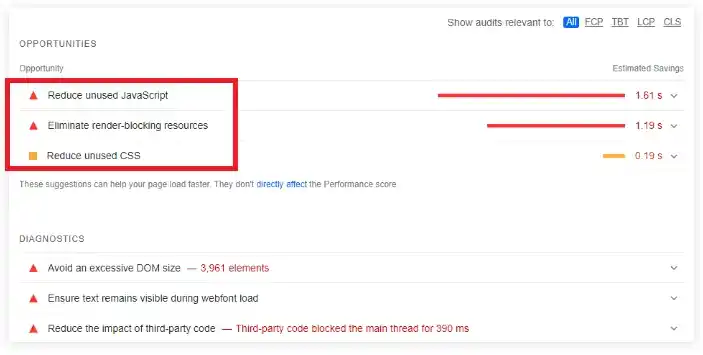
You can also check detailed metrics like:
Largest Contentful Paint (LCP)
First Contentful Paint (FCP)
Cumulative Layout Shift (CLS)
Click on Expand view to read simple analysis of each metric.
PageSpeed Insights provides multiple recommendations and diagnostics to improve website speed. You are also filter them based on Core Web Vitals.
Also Read: What is Review Schema in SEO? Examples & How to Add It
Other useful tools its use are Google Lighthouse. It’s Google Search Console to track and improve your website performance over time.
How To Improve Largest Contentful Paint? Optimize
Here we discuss the Improving First Contentful Paint (FCP) and Largest Contentful Paint (LCP. Its helps your website load content faster and removes issues that assume user experience. Below, you will learn 9 easy steps to improve FCP and LCP like your WordPress website.
1. Improve Your Time To First Byte (TTFB)
We explain the Time to First Byte (TTFB) shows how long the server. They are respond after a user opens your website. It is the first step of page loading. They are server starts sending the needed content to the user’s browser.
TTFB shows how fast our server responds to a user request. A good TTFB means your website and server are properly set up. That’s why choosing high quality WordPress hosting is very important like better speed and performance.
Make sure your web server is set properly according to the daily traffic on your WordPress website. Also check your server memory before deciding. Here are how many processes it can run and how many user requests it can handle at one time.
If you are using a control WordPress hosting plan from Liquid Web. The server is already set up like you. You don’t need to worry about slow loading, content delays, or waiting HTTP requests. Because everything is preconfigured is smooth performance.
2. Use Server-Level Caching
Static websites load faster because they need less processing to show content. WordPress can be using as a headless CMS. But, most WordPress websites are dynamic in nature.
WordPress works using a database. All content is stored there and is combined with theme files to create a web page. This process takes time and affects loading speed.
Caching helps speed up your website by saving readymade copies of pages or database results. So, the server doesn’t have to load everything again.
If your page does not show personal data, server-level caching greatly improves website speed. Use good page cache and object cache plugins like best performance.
3. Eliminate Render Blocking Resources
Render blocking resources are files like CSS and JavaScript that slow down your web page loading. They increase load time and affect website performance and user experience.
Also Read: What is Product Schema? Examples & Types | How to Add
When you open a page, WordPress controls data from the database. It combines things like HTML, CSS, and JavaScript to create the full webpage. This process takes time.
The browser must download all needed files before showing the page. If there are too many files, loading becomes slow and visitors may leave the site. Reducing these files helps improve First Contentful Paint.
Remove unused CSS and JavaScript files. Save only important code loading first and use async or defer like noncritical scripts to improve speed.
4. Inline Critical CSS
Sometimes WordPress websites load CSS asynchronously. They are shown the page without proper design for a few seconds. This is called Flash of Unstyled Content (FOUC). It gives a bad user experience and should be avoided.
Browsers wait until all CSS files in the <head> section are loaded already showing content. Finding critical CSS (the minimum CSS needed like the first visible screen) and adding it directly helps improve speed.
By inlining critical CSS and removing render blocking files. It’s your website can load faster. This very much improves First Contentful Paint (FCP) and Largest Contentful Paint (LCP) on WordPress.
5. Defer Javascript
JavaScript files are common render blocking resources that slow down website loading. By changing how and when JavaScript loads. We are explaining the improving First Contentful Paint (FCP) and Largest Contentful Paint (LCP).
As you know, the browser gets a <script> tag. They stop loading the page to run that script. Using the defer attribute allows JavaScript to load after. The page structure is ready, helping the content show faster.
6. Use A CDN
A Content Delivery Network (CDN) is very important like good website speed. It helps improve First Contentful Paint (FCP) and Largest Contentful Paint (LCP). They save content faster for users and reduce loading delays.
A CDN is a network of servers found in different countries. It stores and serves static files like images, CSS and JavaScript from the nearest server. So, your WordPress website loads much faster than visitors.
7. Avoid 301 Redirects
We are discussing the Redirects are extra steps that the browser takes to reach the final webpage. When a page is redirected then the browser must send multiple requests before loading the actual content.
Also Read: What is Article Schema Markup in SEO? A Complete Guide
Having too many 301 redirects slows down your website and expands the Time to First Byte (TTFB). So, we TTFB are assuming both Largest Contentful Paint (LCP) and First Contentful Paint (FCP). It’s best to save as few redirects as practical.
Check your WordPress website’s redirect paths regularly. They are removing extra redirects to reduce loading delays and improve page speed for visitors.
8. Serve Images In Webp
A CDN helps images load faster. But, image improvement is also very important to improve website speed and learn better FCP and LCP scores.
Images are usually the largest elements on a webpage. So, their loading speed matters a lot. Lazy loading is useful, but it must not be used like important or main images.
Image optimization mainly depends on the correct image size and format. It Compresses images to decrease file size without losing much quality. Choosing the right format gives better speedy results.
Many tools, mostly provided by CDNs, stop automatically adjusting images based on the user’s device. This improves your browsing experience and decreases the load on your main server.
WebP is the image format transferred by Google. Converting images to WebP greatly improves website’s speed and helps to boost both Largest Contentful Paint (LCP) and First Contentful Paint (FCP).
WordPress is planning to add automaticly JPEG to WebP conversion in future updates. So, it was removed from WordPress 6.1. It may be included in upcoming major versions.
9. Delete Any Unused Plugins
Plugins add extra highlights to WordPress and help improve website functionality. Since, there are thousands of plugins available. Its most websites use some plugins at the same time.
However, plugins also add extra code. Heavy or poorly coded plugins slow down your website. Critically affect First Contentful Paint (FCP) and Largest Contentful Paint (LCP).
FAQs (Frequently Asked Questions)
How Do You Fix The Largest Contentful Paint Issue?
Here, we are explaining the improvement Largest Contentful Paint (LCP) by maximizing images (compress, resize, and preload them). It uses fast hosting and a CDN, reducing heavy CSS and JavaScript, enabling lazy loading, improving server response time. They provide priority to above-the-fold content. So, the main part of the page loads fast.
Is LCP Important For Mobile?
Yes, LCP is very important like mobile websites because users expect pages to load fast even on slow internet and low-end devices. Google uses LCP as a ranking factor like mobile search. If LCP is poor, users leave quickly, which reduces engagement, user experience, and conversions?
What Causes Poor LCP?
Poor Largest Contentful Paint (LCP) comes due to slow server response. Its heavy or unoptimized images and videos, render blocking CSS and JavaScript. They are large font files, slow third-party scripts, and delayed loading of above-the-fold content especially on mobile internet and low-performance devices.
Final Thoughts
As your website feels fast or loads quickly at first; they are ignoring LCP (Largest Contentful Paint) problems is a mistake. It can make your site less user-friendly and may reduce the number of visitors or customers.
Also Read: What is FAQ Schema for SEO? Benefits, Examples, & Implementation
Google now uses LCP and other Core Web Vitals to rank websites. So, improving your LCP score not only helps your visitors. But, it also boosts your chances of getting more traffic and business.