
Even if your website ranks high on search engines, people may not always click your links. Product schema helps by allowing search engines to show extra details with your listing, build it more attractive. These rich snippets catch attention and many time lead to more clicks.
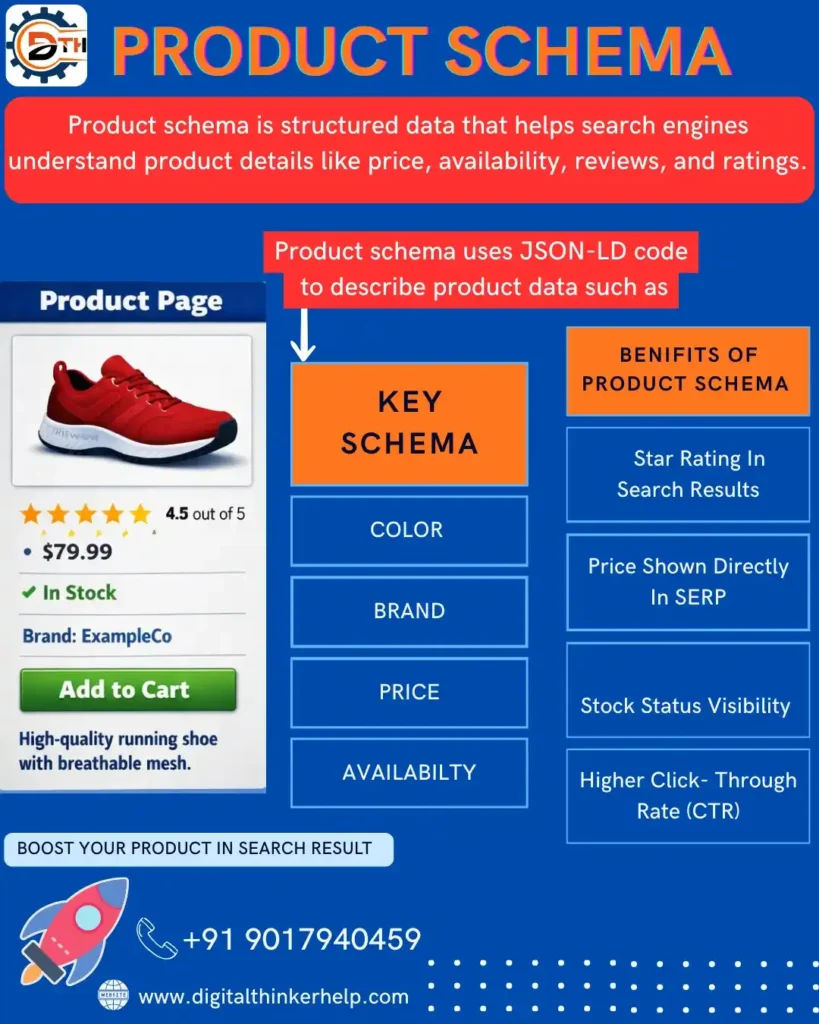
Since adding structured data can be confusing, a clear step-by-step guide with product schema examples helps explain the process and shows how everything fits together.
What is Product Schema?
Here are explain, as you know Product schema allow you adding the clear product details to your listings so we are show rich as results a search engine results pages.
Also Read: What is Article Schema Markup in SEO? A Complete Guide
Properly used structured data helps AI-powered search engines better understand your products and how they relate around your website. While its direct impact on AI summaries is not fully confirmed, accurate schema still improves content know and visibility.
Product schema contains many things like price, reviews, ratings, offers, descriptions, awards, and product variations.
How Does Product Schema Markup Work?
Product Schema Markup adds on the data are WebPages work in the done HTML. So, search engine are easily read and know product details. This data is usually added using JSON-LD, which is Google’s select format
Step-by-Step Process of Product Schema in Action:
Firstly we discuss, schema markup is adding in the page. Order product details like name, price, and reviews a structured setup.
Next, search engines crawl the page and read this structured data to check that the information is correct.
If anyone builds right, rich snippets look in search results, show details like star ratings, prices, and stock status.
These increase listings improve clarity and encourage more clicks because users are see helpful product information right away.
Implementing Product Schema – Benefits
Using product schema like SEO offers many benefits, especially like users and how they interact with your brand. It helps search results look more informative and attractive. Here we are explaining the few benefits are following the step.
Enhanced Search Engine Visibility
Product structured data helps search engines clearly know your product. Which improves clarity and start more visitors and likely customers?
With schema markup, your search results are show rich snippets like ratings, reviews, prices, or other helpful details direct in the SERPs.
These enhanced listings stand out alike daily results and attract users’ attention, increasing the chance of getting clicks.
Schema markup also improves click-through rates but users are more likely to choose listings that show helpful information such as star ratings or pricing upfront.
By making your listings clearer and more attractive, schema markup supports better organic clicks and all on-page SEO performance.
Better User Experience
User experience improves when search results show useful product information, helping people make better buying choice.
Also Read: What is FAQ Schema for SEO? Benefits, Examples, & Implementation
Schema markup adds extra items like price, ratings, and clearness to search results, creating listings clearer, more visible, and more likely to get clicks.
Search results with more information look better, that builds trust and inspire users to click.
Compatibility with Various Platforms
Schema is a structured language that search engines like Google and Bing are easily understand. It helps your products appear clearly and consistently around different platforms, providing users a better experience no matter where they search. This thickness improves clarity and helps your brand grow online.
Google: On Google, product schema helps your listings show rich snippets like product report, prices, and images. These improved details make your products stand out on the search results page, attract more notice, and we are inspire users to click.
Bing: Bing also supports product schema and uses it to show rich product details in search results. As your data is perfectly structured, Bing highlights your products in a same way to Google, helping you reach more users and gain extra clarity.
How to Create Product Schema? Example
Product schema is being created using different formats such as JSON-LD, RDFa, or Micro data.

The size of the schema code depends on how many details you include. It very short with basic information or more detailed with multiple layers of data connected to each other.
Also Read: Alternate Page with Proper Canonical Tag – How to Fix
Google’s own examples show product schema with few properties, including the product name, description, brand, and SKU number, to surely define the product.
<html>
<head>
<title>Executive Anvil</title>
<script type=”application/ld+json”>
{
“@context”: “https://schema.org/”,
“@type”: “Product”,
“name”: “Executive Anvil”,
“image”: [
“https://example.com/photos/1×1/photo.jpg”,
“https://example.com/photos/4×3/photo.jpg”,
“https://example.com/photos/16×9/photo.jpg”
],
“description”: “Sleeker than ACME’s Classic Anvil, the Executive Anvil is perfect like the business traveler looking a reality to drop from a height.”,
“sku”: “0446310786”,
“mpn”: “925872”,
“brand”: {
“@type”: “Brand”,
“name”: “ACME”
},
“review”: {
“@type”: “Review”,
“reviewRating”: {
“@type”: “Rating”,
“ratingValue”: “4”,
“bestRating”: “5”
},
“author”: {
“@type”: “Person”,
“name”: “Fred Benson”
}
},
“aggregateRating”: {
“@type”: “AggregateRating”,
“ratingValue”: “4.4”,
“reviewCount”: “89”
},
“offers”: {
“@type”: “Offer”,
“url”: “https://example.com/anvil”,
“priceCurrency”: “USD”,
“price”: “119.99”,
“priceValidUntil”: “2020-11-20”,
“itemCondition”: “https://schema.org/UsedCondition”,
“availability”: “https://schema.org/InStock”
}
}
</script>
</head>
<body>
</body>
</html>
The schema code is added direct to the page’s HTML. We are using a content management system like WordPress, this usually be done alike the page’s advanced or plugin settings.
How to Add Product Page Schema Markup?
There are some steps that you must be following, including:
Step 1:
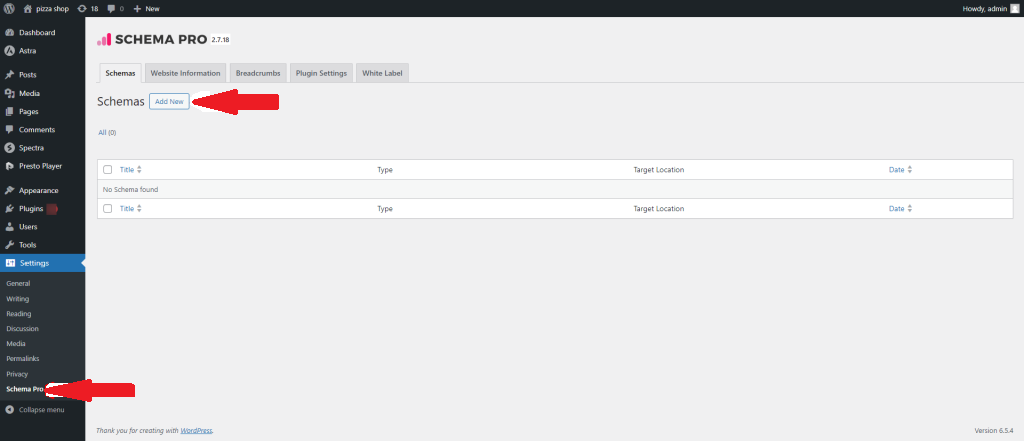
Go to your WordPress Dashboard and follow to Settings → Schema Pro. Click on “Add New” to create a new schema markup.
Step 2:
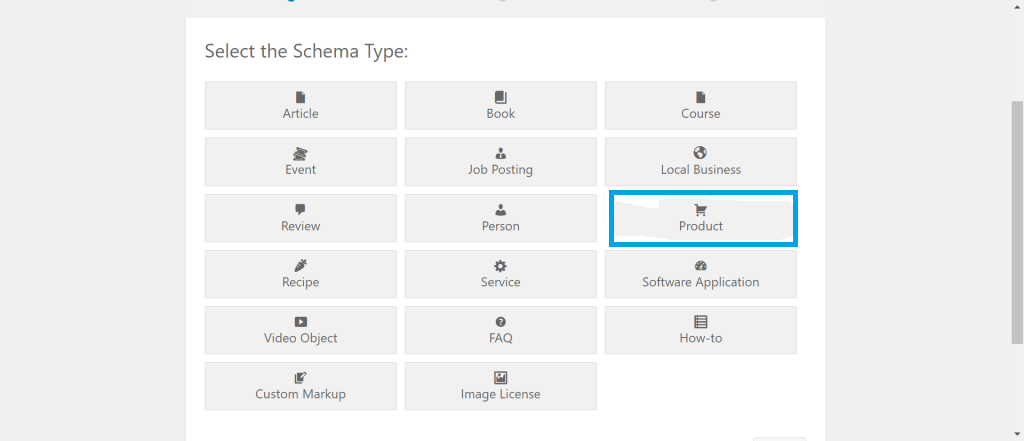
Select “Product” as the schema type alike the available choice.
Step 3:
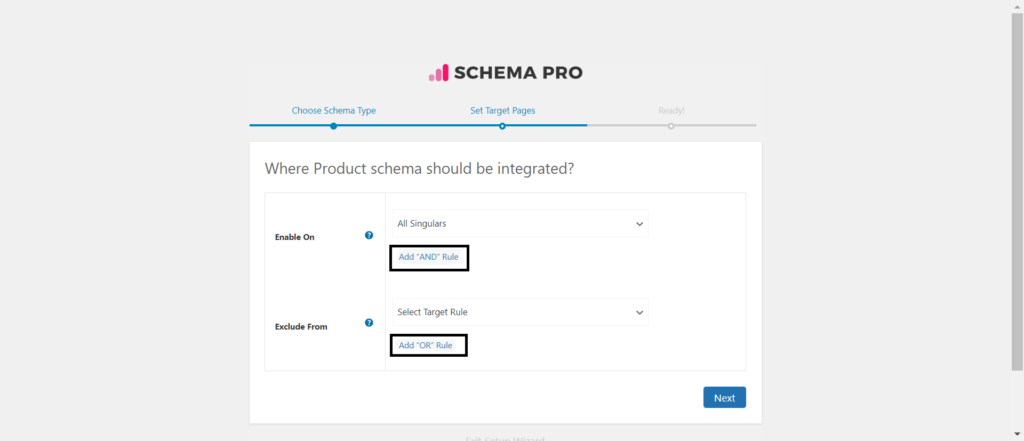
Select the pages or posts where you want this product schema to look. We are set show rules and also exclude any pages or posts where you do not like the schema applied.
Step 4:
Complete the basic setup. After this, you’ll be directed to a section where you need to fill in the needs product schema properties.
Also Read: What is Canonical Tag in SEO? Examples & Uses – Full Guide
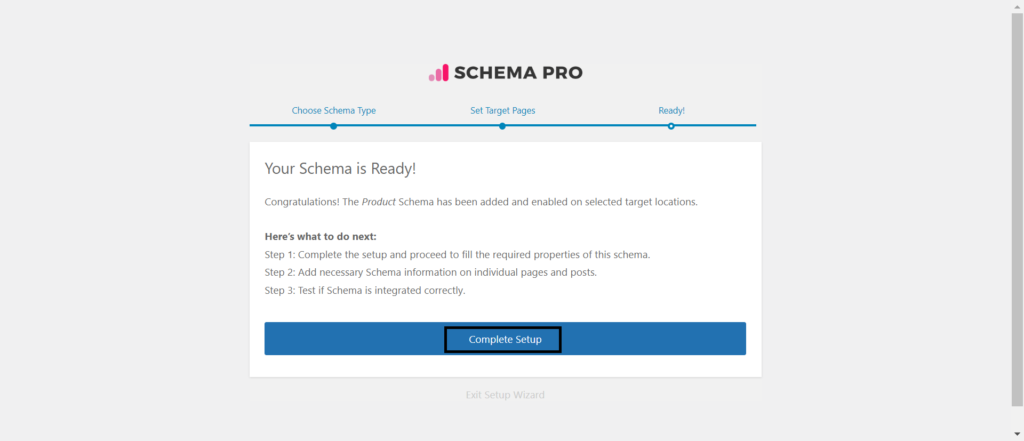
Step 5:
In the Schema Settings, you’ll find many fields connected to product details. Carefully enter accurate information in each field to make sure correct schema performance.
In the next section, you we examine and know all the available fields used in product page schema markup.
Product Schema Type Setup & Available Options
Now, let us talk at each available option and understand them in simple language:
Product Name
Enter the name of your product here. This field is needs. You are also use variables if the product name is already mentioned in the post title.

Product URL (PRO)
By default, the %url% variable automatically uses the URL of the current page. If the product is sold on another website, such as Amazon, are you enter that external product URL instead.

Review Location
This option allows you to choose where the schema information will appear on the page. As you know display it above the content, below the content, both, or place it in a custom location using a short code.
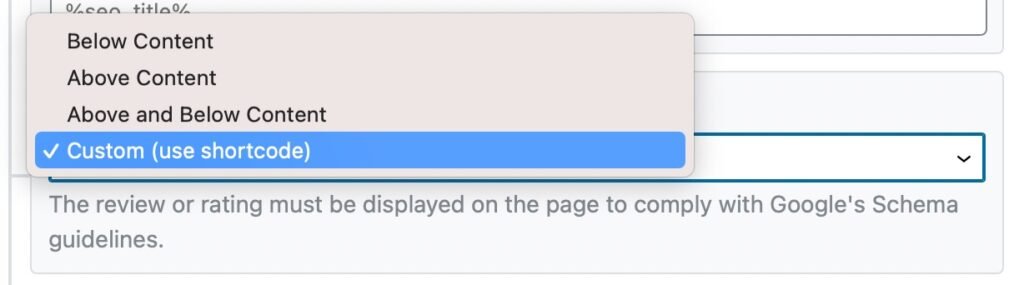
Short code
You are chose the short code, As you know copy the short code this field and paste it into your post how do you like the review or schema content is look.
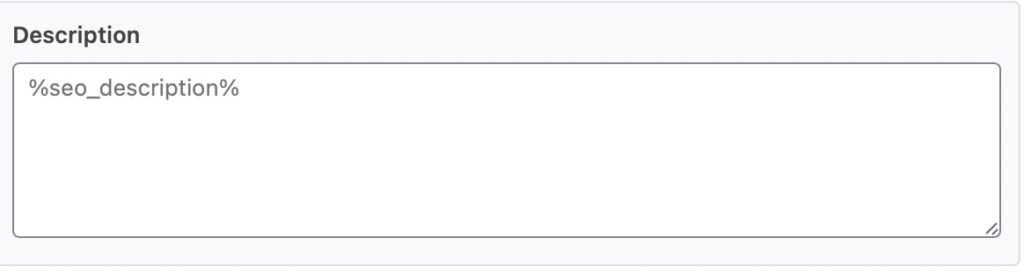
Description
Add a brief description of the product. We also use variables to automatically generate a dynamic description.
Product SKU
Enter the product’s unique Stock saving Unit (SKU), which helps identify the product in inventory systems.
Brand Name
Type the name of the brand that manufactures or sells the product.
Brand URL (PRO)
Add the official website URL of the brand.
GTIN (PRO)
Enter the Global Trade Item Number (GTIN), which is a unique product finding created by GS1. Different GTIN formats include:

GTIN-12 (UPC): 12 digit code are most used in North America
GTIN-14 (ITF-14): 14 digit code like packaging levels
EAN: 8 or 13 digit code used mostly in Europe
JAN: 8 or 13 digit barcode used in Japan
ISBN: 13-digit code used only like books
MPN (PRO)
The Manufacturer Part Number (MPN) is a single number set by the manufacturer. Enter this number to further find the product.
Additional Type (PRO)
If another Schema.org data type better describes your product, you are adding here. You may also link to external sources like Wikipedia or Wiki data.
Add Manufacturer (PRO)
Enable this choice to include manufacturer details. Rank Math will automatically use your Organization data from Local SEO settings.
Offers
Offers are optional like editorial reviews. Here, you add pricing details such as:
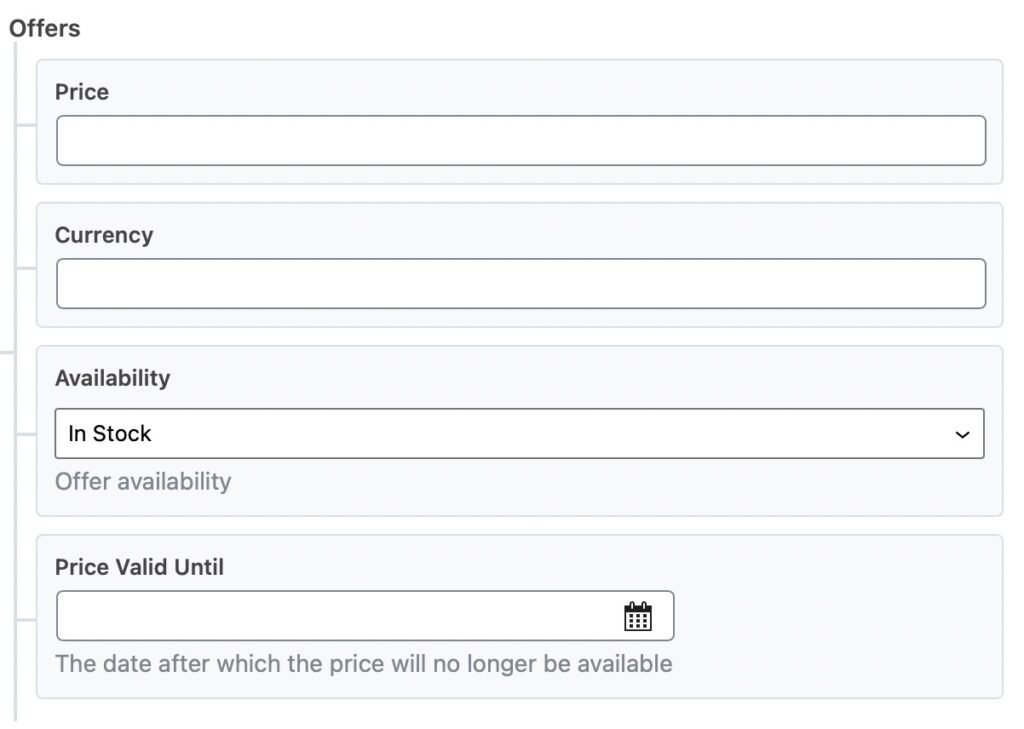
Price: Enter only the number
Currency: Use the ISO 4217 currency code
Availability: Are select Stock, out of stock, or Preorder
Price Valid Until: We select the date until the price is valid
Review
Enter the product’s rating score. You can also define the minimum and maximum values of your rating scale.
Pros and Cons (PRO)
Add the advantages and disadvantages of the product. Enter only one point per line. This choice is available only in the PRO version and is meant like editorial reviews.
Also Read: What Are Commercial Keywords in SEO? Examples & How to Find Them
And that’s it! Once you’ve build changes to the Product Schema like this page, click Save. After that, save the page as usual or click publish a new page. You are confirming your schema using Google’s Rich Results Testing Tool to make sure all is working is perfectly.
FAQs (Frequently Asked Questions)
What Is The Difference Between Product Schema and Product Snippets?
Product Schema is structured data added to a webpage that helps search engines know product details such as price, clearness, and ratings. Product Snippets are the improved results shown in search pages when this schema is used correctly. In we are explaining, Product Schema works in the background, its Product Snippets are what users see and click on in search results.
What’s The Difference Between Product Schema and Aggregate Rating Schema?
Product schema is used to define single products, while aggregate rating schema is used to highlight review and rating information. Most ecommerce websites use both close, placing aggregate ratings inside the product schema.
Does Product Schema Directly Impact Rankings?
Product Schema does not directly boost search rankings. But it builds product listings more informative and attractive, which are increase click-through rates (CTR). A higher CTR shows search engines that users find your content important, which may help rankings by time. It also helps search engines know your products better, better the chances of looking in rich results, Google Shopping, and voice search.
What Happens If Product Schema Is Implemented Incorrectly?
Incorrect use of schema is make your pages ineligible like rich snippets and may even hurt search clarity. Common errors include showing information that does not match the page content, missing needs fields, or adding Product Schema to category pages instead of single product pages. Checking and updating schema daily helps follow Google’s Structured Data Guidelines and stop your search performance.
Verdict Up
Product Schema is a helpful tool to boost your website’s clarity and attract more clicks in search results.
Also Read: What are Transactional Keywords in SEO? Example & How to Find Them
By sharing clear details around your products, your site stands out from competitors and encourages users to visit. You analyze the best results, make sure your product schema is correct, complete, and free of errors.