
As you know, star rating a high number of reviews to buy build a location like a stand out or honest. This is the elements of the review schema markup on the page. They helps to increase online visibility, or build trust, and more attract in your SERP listing.
As you know, SERP grows the little by little and daily organic listening get push down page. Review schema is not only helping to build trust; instead of this, it is most pixel space in searching result.
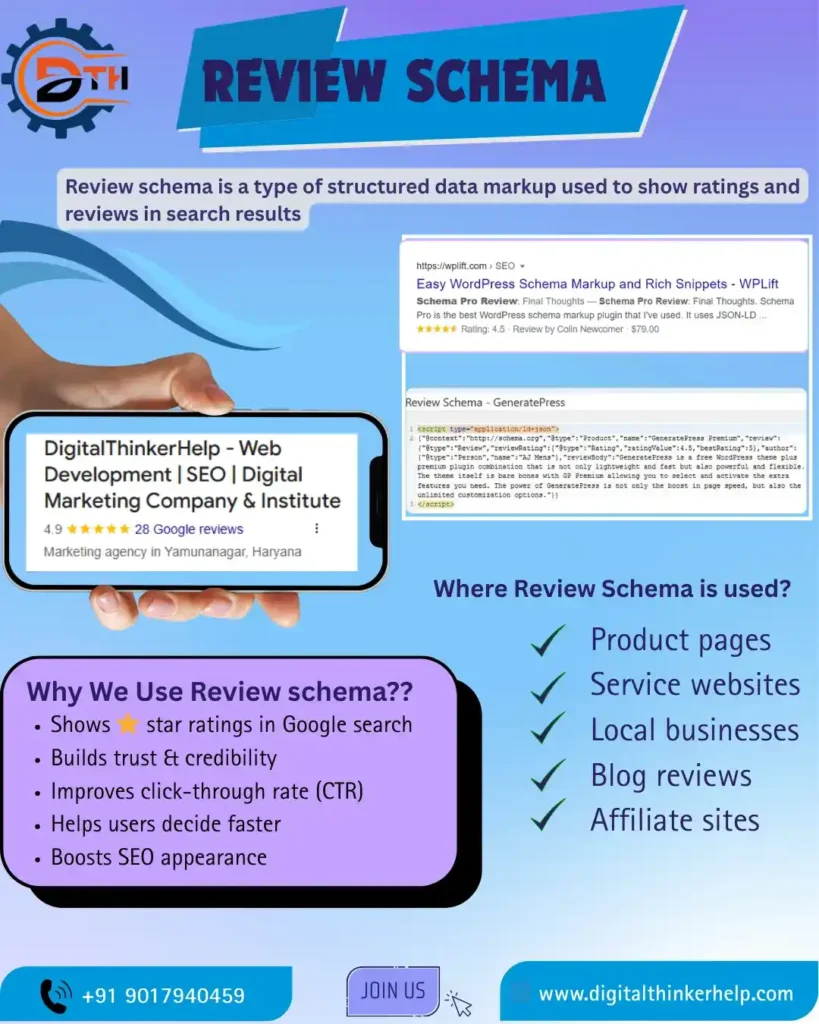
In this blog, we discuss about Review schema and how to develop it in big website. Yes, it is possible without paying funds or tension a tech stack
What is Review Schema?
Review schema is a way of style is tell the search engine about on your websites. Schema is a best structured data. Did you know, you can add the extra code of page tell about on reviews and rating for search engine. They have to provide a clear information:
Also Read: What is Product Schema? Examples & Types | How to Add
- Who wrote the review
- What was reviewed, e.g., the product, service, book, course, or movie
- The rating or score given
- Optional details like the review date or a short description
As you know, when implement good then review schema allow showing the rich result on Google. They also let showing your website on search result and knowledge panel. They improve the search results are involve review counts, star ratings, and snippets like reviews.
But, Google same as all things; and schema markup not guarantee in the rich results is showing.
Benefits of Implementing Review Schema
Enhanced SERP Visibility
In a sea of plain text results, this schema helps your listing stand out especially on mobile. By showing eye catching on star ratings that attract notice and increase clicks.
Instant Social Proof
Trust begins directly in search results. When users see positive reviews and ratings upfront, it builds confidence and encourages clicks. Rich snippets with star ratings attract better than plain listings in terms of click-through rates.
Improved Content Clarity for Search Engines
This is not an easily and direct ranking factor. Review schema just helps the improve search result and know you SEO content. They help to increase the chance of the context visibility in good searches.
Enhanced Knowledge Panel
Like business in a knowledge panel, reviews schema add a social proof. Its help boosting trust and authority in our brand.
Types of Review Schema For Google
There are mainly two types of review schema markup, like as:
Simple Reviews
Focus is single behalf. Many time found in user feedback or editorial review.
Usually involve the detailed comments and reviewer’s name.
Aggregate Ratings
Review schema summarizes all your reviews, showing the total number and the average rating.
It’s great for businesses, products, or services with many customer reviews.
When done properly, review schema makes your listing more attractive in search results and helps users notice your ratings easily.
- Star ratings (usually on a 1-5 scale).
- Total review counts.
- Average scores.
- Individual reviewer names (for editorial reviews).
Then, review schema changes your normal search result into a standout snippet.
A result like this grabs attention, and users are more likely to visit your site.
Common Issues with Review Schema Implementation
If review schema is not implemented correctly then it can generated errors, penalties, or less your chances of showing in search results.
Also Read: What is Article Schema Markup in SEO? A Complete Guide
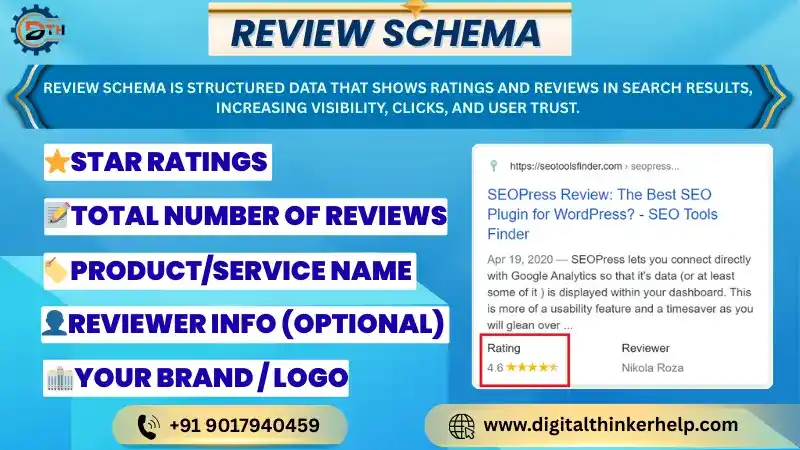
Here are the common mistakes and best practices to follow when adding review schema to your website.
Incorrect Use of Aggregate vs. Single Review Schema
Issue: Websites much time confuse Aggregate Rating with a single Review.
Fix: Use multiple reviews when summarizing and reviews like single user reviews.
Self-Serving Reviews (Google’s Policy Violation)
Issue: Adding review schema to reference written by yourself or your team goes against Google’s rules.
Fix: Only use review schema like real reviews from genuine customers. Not content created by the website owner or staff.
Using Review Schema on Ineligible Pages
Issue: Adding review schema on pages without real reviews. Like homepages or category pages, is against Google rules.
Fix: Use review schema only on pages that have actual reviews. Such as product pages, service pages, or review articles.
Missing or Incomplete Required Properties
Issue: Missing important fields like author, date Published. Review Rating makes your review schema invalid.
Fix: Always fill all needed fields with correct and real information to avoid errors.
Incorrect or Inconsistent Rating Values
Issue: Using ratings outside the 1–5 range (like 0 or 10). Showing different ratings in schema than on the page can create problems.
Fix: Always use a 1–5 rating scale and make sure the structured data matches what users see on the page.
Improper Nesting in JSON-LD Format
Issue: Placing review schema in the wrong place. Like putting it incorrectly inside a Product schema, can cause errors.
Fix: Follow Google’s structured data rules and make sure to nest schemas correctly are using multiple types on a page.
Tools for Testing and Implementing Review Schema
Google’s Structured Data Testing Tool
A old Google Structured Data Testing Tool is no extended available. But it was very helpful like checking website structured data. Now, the Rich Results Test is used instead. It helps you see if your page is set up correctly for rich snippets. Including review stars, make sure your content works well in Google search results.
Also Read: What is FAQ Schema for SEO? Benefits, Examples, & Implementation
You can use the Rich Results Test by entering your page URL or pasting your code. It checks your review schema like errors and shows what needs fixing. The tool also gives easy-to-follow hint to correct issues. It’s helping your content show more prominently in Google search results.
Keep in mind that the Rich Results Test mainly shows how Google sees your schema. Still, it gives a good idea of whether your structured data follows best practices. This is very helpful when improving your website’s SEO?
Schema.org Validator
The Schema.org Validator, earlier called the Schema Markup Validation Tool (SMV). It is very useful for checking your review schema. It carefully checks your markup against schema.org standards and points out errors like missing fields or wrong item types. We can use it by entering your page URL or pasting your schema code. The tool fast reviews JSON-LD, Micro data, or RDFa, and provides feedback to help you fix and improve your markup.
This validator works like a second pair of eyes. And make sure your structured data is in correct and ready form to perform well. It helps your pages show rich results, improving visibility and user engagement. Using it is an important step to build your SEO strategy more successful.
Example Reviews Schema for Products & Services
Now that we know when and how to use review schema. let’s see what it looks like in real use. Below are few simple JSON-LD examples you are copy and use on your own website.
Example of Review Schema for Products
<script type=”application/ld+json”>
{
“@context”: “https://schema.org”,
“@type”: “Product”,
“name”: “Custom Birthday Cake”,
“brand”: “Sweet Treats Bakery”,
“aggregateRating”: {
“@type”: “AggregateRating”,
“ratingValue”: “4.9”,
“reviewCount”: “28”,
“bestRating”: “5”,
“worstRating”: “1”
},
“review”: [
{
“@type”: “Review”,
“author”: “Alex P.”,
“datePublished”: “2025-02-10”,
“reviewBody”: “The cake was delicious and beautifully decorated. Highly recommend!”,
“reviewRating”: {
“@type”: “Rating”,
“ratingValue”: “5”,
“bestRating”: “5”,
“worstRating”: “1”
}
},
{
“@type”: “Review”,
“author”: “Samantha K.”,
“datePublished”: “2025-03-05”,
“reviewBody”: “Perfect cake for my birthday party. Everyone loved it!”,
“reviewRating”: {
“@type”: “Rating”,
“ratingValue”: “5”,
“bestRating”: “5”,
“worstRating”: “1”
}
}
]
}
</script>
Example of Review Schema for Services
<script type=”application/ld+json”>
{
“@context”: “https://schema.org”,
“@type”: “Service”,
“name”: “Emergency Locksmith Service”,
“provider”: {
“@type”: “LocalBusiness”,
“name”: “Birmingham Locksmiths”,
“address”: {
“@type”: “PostalAddress”,
“streetAddress”: “123 High Street”,
“addressLocality”: “Birmingham”,
“postalCode”: “B1 2AB”,
“addressCountry”: “GB”
}
},
“aggregateRating”: {
“@type”: “AggregateRating”,
“ratingValue”: “4.8”,
“reviewCount”: “42”,
“bestRating”: “5”,
“worstRating”: “1”
},
“review”: [
{
“@type”: “Review”,
“author”: “Jane D.”,
“datePublished”: “2025-01-15”,
“reviewBody”: “Fast response and very professional. Got me back into my house in no time!”,
“reviewRating”: {
“@type”: “Rating”,
“ratingValue”: “5”,
“bestRating”: “5”,
“worstRating”: “1”
}
},
{
“@type”: “Review”,
“author”: “Mark L.”,
“datePublished”: “2025-02-20”,
“reviewBody”: “Very reliable service. Arrived quickly and fixed the lock efficiently.”,
“reviewRating”: {
“@type”: “Rating”,
“ratingValue”: “4”,
“bestRating”: “5”,
“worstRating”: “1”
}
}
]
}
</script>
How to Add the Review Schema Markup?
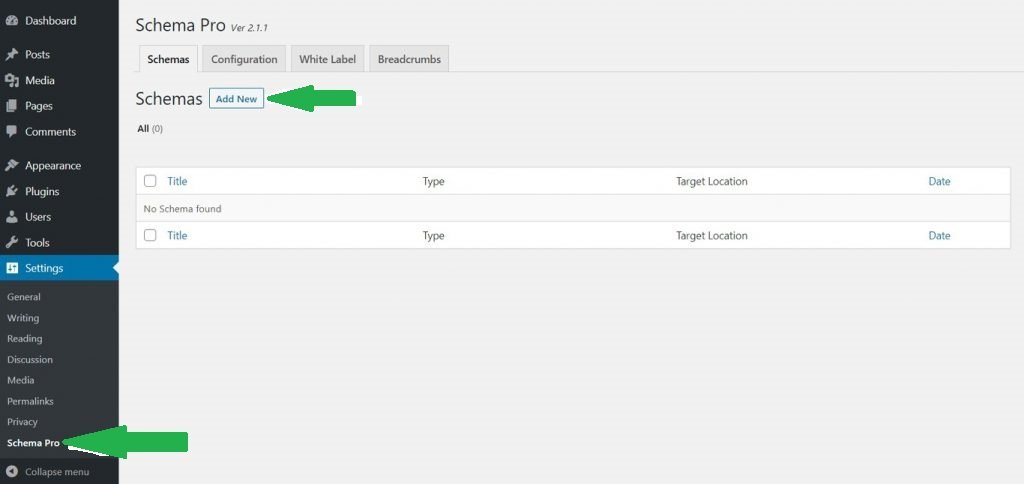
1) Step: Go to WordPress Dashboard > Settings > Schema Pro and click “Add New” to create a new schema markup.
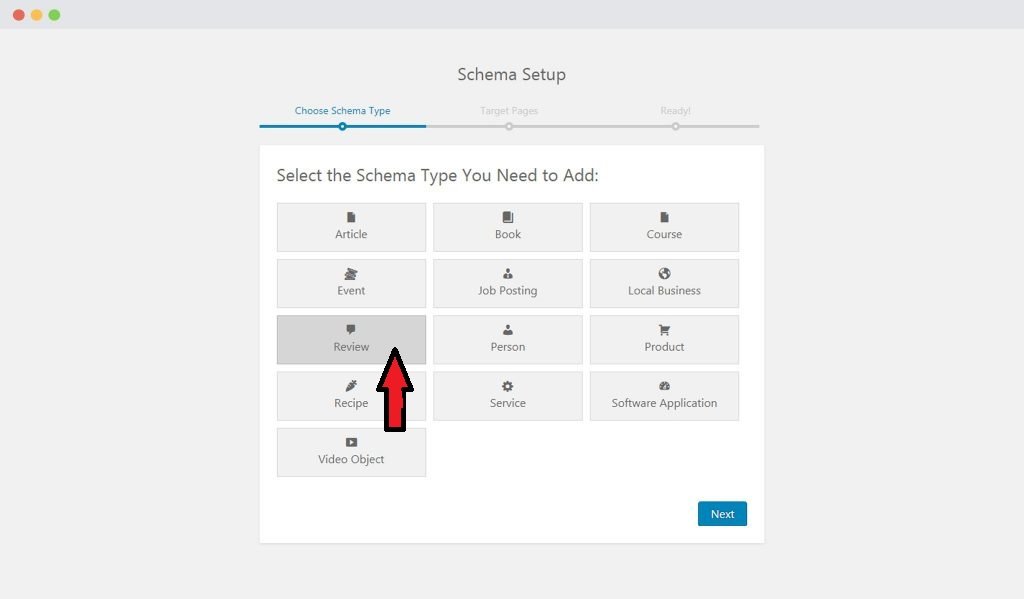
2) Step: Choose the schema type as “Review.”
3) Step: Select the pages or posts where you want to apply this review schema. You can also set rules to exclude certain pages or posts.

4) Step: Complete the setup. You will then be guided to fill in the required schema properties.
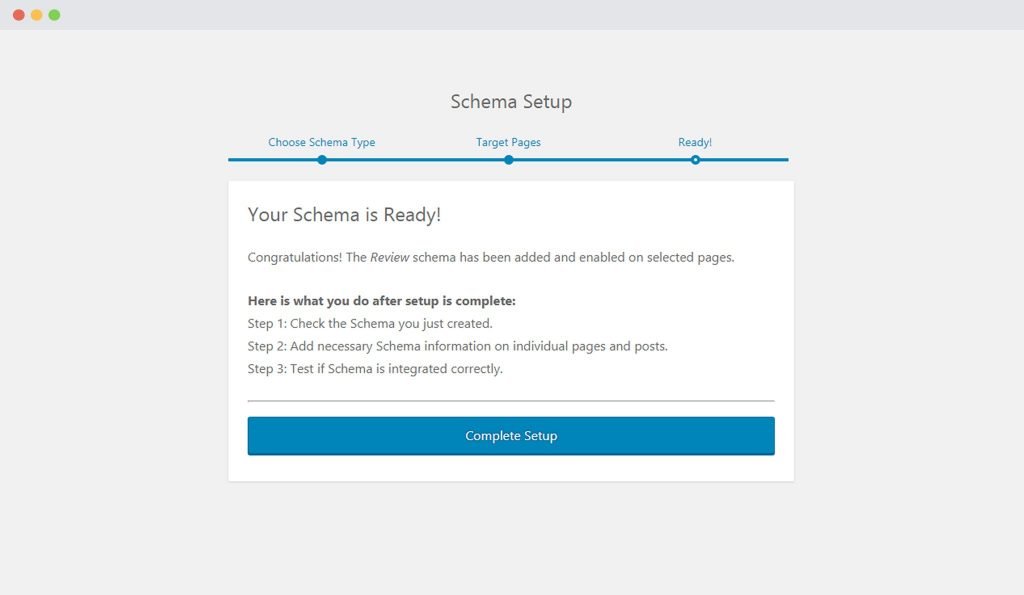
5) Step: In Schema Settings, you will see fields related to the review schema. Fill in all fields carefully with the correct values for your reviews.
Check the next section to learn about all available fields in review schema and how to use them properly.
Tips for Optimizing Review Schema
Don’t assume that you are an expert in schema markup just yet. While knowing how to set it up is important. Using schema effectively is more of an art than it looks.
Also Read: What Are Commercial Keywords in SEO? Examples & How to Find Them
To help you learn the best results. Here are few simple tips to optimize your schema markup:
Make sure Visibility: Make sure reviews are easy to see on your web pages.
Focus on Specific Items: Add schema like each product or service, not for broad categories.
Update Ratings: Save your average ratings fresh by adding new reviews regularly.
Don’t Aggregate External Reviews: Only use reviews from your own customers.
Use Reviewed By and Publishing Info: Include these to make your reviews more trustworthy.
Consider Editor Schema: If you have an editing process, mentions the editor in the schema.
Following these tips will help your review schema stand out. Improve clarity in search results, and attract more visitors to your site.
FAQs (Frequently Asked Questions)
How Does Reviews Schema Impact SEO?
Review schema allows making your search results more attractive by showing star ratings and review summaries. This helps your website get noticed more, get more clicks, and even improve your search rankings.
Can Fake Reviews Harm My SEO?
Yes! Using fake or paid reviews can create penalties from search engines. This can damage your website’s rankings and trust, and may also harm your brand’s credibility with users.
Why Is Reviews Schema Important For Saas Companies?
Review schema helps SaaS companies show customer feedback, build trust, and make their listings stand out in search results. This attracts more interested users and increase leads and conversions.
Bottom Lines
Using review schema, you care about making your website better showing on SERP. When done correctly, it makes your content stand out. And, this also helps search engines understand it and engages potential customers. Instead of this, it also increase visibility, get more clicks, build trust and credibility for your site.
Also Read: What are Transactional Keywords in SEO? Example & How to Find Them
Remember, by using the right tools and a careful approach to create, check, and test your review schema. You can get great results. Avoid common mistakes like overusing it, wrong formatting, or skipping validation to make sure your efforts pay off.
As technology and search engines keep changing. It is important to stay updated on the best ways to use schema. Use review schema carefully, and it will help guide users to see the unique value your site offers.